

Moving a website to a completely new domain, platform, or structure is one of the highest-risk activities in SEO. When it is done right, it protects your organic visibility and even unlocks growth. Done wrong, it wipes out years of search equity overnight.
Site migrations are among the top three causes of sudden organic traffic loss for established businesses when SEO is not handled systematically.
Meanwhile, Backlinko states that structured migrations with proper redirects, content mapping, and post-launch monitoring recover rankings significantly faster than ad-hoc migrations.
Therefore, a clear, execution-ready SEO site migration checklist is very important for a business’s safeguard.
In this article, you will explore the steps to moving domains without losing rankings, using proven frameworks trusted by SEO agencies, enterprise brands, and Google-aligned best practices. Additionally, we will walk you through before, during, and after migration, backed by verified data and real-world SEO logic.
Quick Answer for SEO Migration Checklist
SEO migration is the structured process of moving a website (domain, CMS, URLs, or architecture) while preserving search rankings, traffic, and authority.
A successful migration requires:
- Pre-migration audits and URL mapping
- Correct 301 redirects and canonical handling
- Technical SEO validation during launch
- Post-migration monitoring and fixes
Skipping any step increases ranking loss significantly.
What You’ll Learn:
- What SEO migration actually means for rankings and revenue
- Different types of migrations and their SEO risk levels
- A detailed SEO migration checklist for before, during, and after launch
- Common migration mistakes that cause traffic drops
- How long do rankings take to stabilize after migration
- When a 301 redirect is not enough
What Is SEO Migration & Why Does It Matter?
SEO migration refers to any major website change that affects how search engines crawl, index, or rank your site. This includes domain changes, URL restructuring, CMS switches, or protocol updates.
From Google’s perspective, migration resets trust signals unless you preserve them deliberately. Links, content relevance, internal linking, and crawl paths must remain intact. Otherwise, Google treats the new setup as a new entity, not a continuation.
This matters because organic traffic is not just visits. For businesses, it is pipeline, revenue, and brand authority. SEMrush confirms that organic search drives over 53% of trackable website traffic globally, making SEO losses costly
A strong domain migration SEO strategy ensures continuity. It protects years of SEO investment while positioning your site for long-term scalability.
Types of Site Migrations (And Their SEO Risk Levels)
Not all migrations carry the same level of risk. Some are cosmetic. Others are structural.
Common SEO Migration Types
| Migration Type | SEO Risk Level | Key Focus Area |
| Domain change (example.com → newdomain.com) | High | Redirects, backlinks, branding |
| URL structure change | High | URL mapping, internal links |
| CMS change (WordPress → Headless) | Medium–High | Rendering, indexing |
| HTTPS migration | Medium | Canonicals, mixed content |
| Site redesign | Medium | Content parity, UX signals |
| Subdomain to subfolder | Medium | Authority consolidation |
Domain migrations sit at the top because they involve external signals, especially backlinks. This is where a seo site migration checklist becomes critical.
You can also explore the Technical SEO Audit Guide (With Tools & Checklist for websites)
Pre-Site Migration SEO Checklist (Before You Touch Anything)
This phase determines success more than any other. Preparation is where rankings are saved.
1. Benchmark Your Current SEO Performance
Start by capturing a complete snapshot of your current site:
- Organic traffic by page
- Keyword rankings (top 100 priority terms)
- Indexed URLs
- Backlink profile
These benchmarks act as your migration success baseline. Without them, you cannot measure recovery or loss.
Use tools like Google Search Console and Google Analytics as primary sources. Third-party tools support analysis, but Google data is the ground truth.
For more detailed information on Link Building, explore Link Building Strategies
2. Create a One-to-One URL Mapping File
Every existing URL must have a clear destination. No exceptions.
- High-value pages map to equivalent or better pages
- Removed pages redirect to the closest topical match
- Never redirect everything to the homepage
This mapping file becomes the foundation for redirects, QA, and validation. Most ranking losses happen because URLs are redirected blindly.
If you are planning a domain move and are not sure if your URL mapping is SEO-safe? 6S Marketers helps businesses audit, map, and migrate without ranking losses. Connect with our SEO specialists before you launch.
During Migration SEO Checklist (Launch Phase)
Launch day is not the finish line. It is the highest-risk window.
1. Implement Clean 301 Redirects
Use 301 redirects to signal permanent moves. Redirect chains, loops, or mixed status codes dilute authority.
Key rules:
- Old URL → New URL (single hop)
- No 302s for permanent moves
- Test redirects at scale
Google confirms that 301 redirects pass most ranking signals when implemented correctly.
2. Update Technical SEO Signals in Real Time
During launch, ensure:
- Canonical tags point to new URLs
- XML sitemap reflects only new URLs
- Robots.txt does not block critical sections
- Internal links use new URLs
This alignment ensures Google crawls and indexes the new site without confusion. A misaligned canonical setup can override perfect redirects.
Post-Migration SEO Checklist (After Launch)
Post-migration is where recovery and growth happen.
1. Monitor Indexation and Crawl Errors Daily
Use Google Search Console to track:
- Coverage errors
- Soft 404s
- Redirect errors
- Indexed page counts
Expect temporary fluctuations. However, sustained errors signal structural issues that need immediate fixes.
2. Validate Rankings and Traffic Against Benchmarks
Compare post-migration performance with your pre-migration baseline:
- Are priority keywords returning?
- Are top landing pages recovering?
- Is traffic stabilizing week over week?
Most well-executed migrations stabilize within 4–8 weeks, according to industry observations cited by Search Engine Land.
Common SEO Migration Mistakes That Kill Rankings
Even experienced teams make avoidable mistakes.
1. Treating Migration as a Dev-Only Task
SEO migration is not just technical. It involves content, links, UX, and search intent. When SEO is looped in late, damage is already done.
2. Ignoring Post-Launch Optimization
Many businesses stop after redirects. However, internal linking, content gaps, and crawl efficiency often need tuning after launch. SEO migration is a process, not a one-day event.
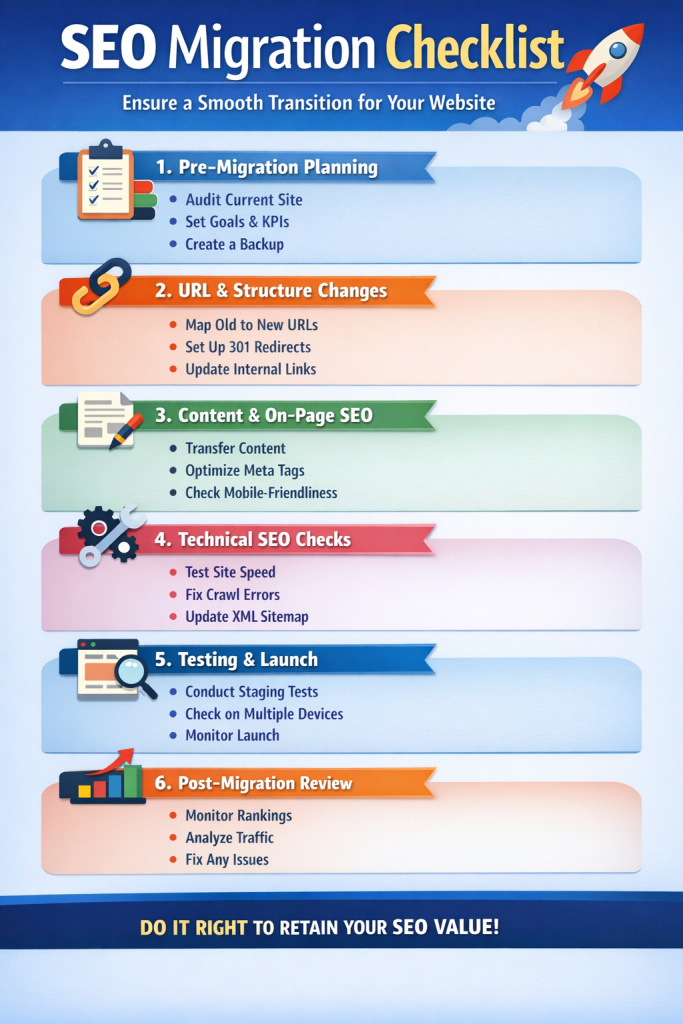
Final SEO Site Migration Checklist Summary
Use this condensed seo migration checklist as your control sheet:
- Benchmark rankings, traffic, and URLs
- Map every old URL to a relevant new URL
- Preserve content quality and intent
- Implement clean 301 redirects
- Update canonicals, sitemaps, and internal links
- Monitor Search Console daily post-launch
- Optimize and stabilize within 30–60 days
This framework protects authority and accelerates recovery.
nd execution quality. Large enterprise sites may take longer. Clean redirects and consistent signals speed up stabilization.
Conclusion
SEO migration is a moment of truth for any business. It shows if SEO is treated as a growth asset or a second thought.
A well-planned SEO site migration checklist helps protect your brand visibility, authority, and revenue. It also gives opportunities to fix legacy SEO issues and scale faster post-launch.
If you want your migration handled with precision, 6S Marketers helps businesses plan and execute SEO-safe migrations with zero guesswork. From audits to redirects to post-launch recovery, our SEO team ensures your rankings move forward, not backward.
Connect with 6S Marketers to migrate smarter, safer, and stronger.