

Introduction
Local businesses and agencies face hassles to keep their online presence fresh. Since they handle multiple locations, run campaigns or events frequently, communicating these to customers by manually posting to each location’s profile is time-consuming and error-prone. Consistency often affects. Critical announcements get delayed or missed, especially during busy hours. With Google now adding scheduling and multi-location publishing to Google Posts, businesses finally have a way to streamline updates, maintain consistent messaging, and manage multiple locations with less effort.
In this blog post, we will break down what these new features are, how they work, why they matter for local businesses (and agencies), and how you can start using them today.
What Is Google Business Profile Post Scheduling?
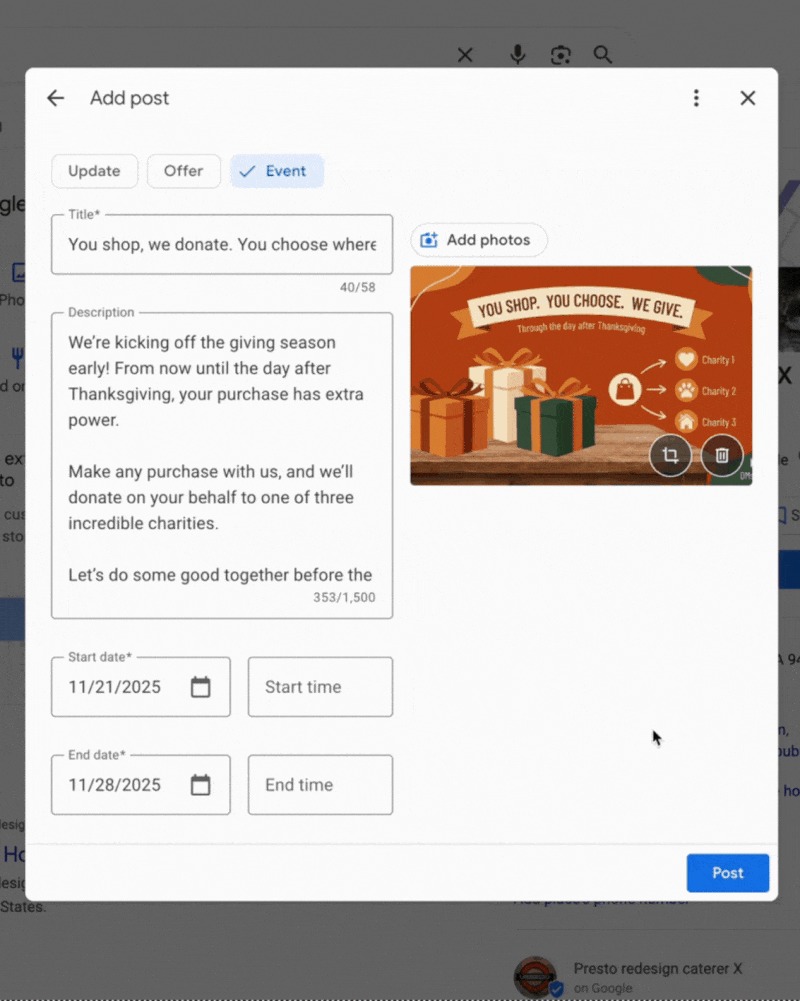
Lately, Google added a new feature which allows businesses to schedule posts on their Google Business Profile.
With the “Schedule this post”, you can pick a future date and time for when your update should go live.
It is a great feature that helps business owners and marketers plan their content calendar in advance. If you manage multiple campaigns, seasonal promotions, or events, or want to maintain a presence without manually labouring every day, this is helpful.
Multi-Location Publishing Feature
Multi-location publishing feature is the second important Google update to the Google Business Profile. You can now post to multiple locations in one click if you have more than one location set up. For instance, if you have a retail store chain and your stores are located in many branches.
Once you create a post for a location, a “Copy post” or “Publish to other locations” dialogue appears. This dialogue will have a list of other locations you manage.
Benefits for Local Businesses
These new features bring clear benefits for local businesses and agencies, like:
- Save Time and Effort
Scheduling posts means you can batch-create content and queue it for later. Multi-location publishing reduces repetitive work. Together, these features free up time you’d otherwise spend logging in, drafting, copying, and publishing manually.
- Consistent Communication Across Locations
By publishing your message at multiple locations, you can ensure that the voice, offers or announcements of your brand do not go out of sync at different branches. You won’t miss your target at any location during a large-scale campaign.
- Effective Planning & Strategy
Scheduling allows you to outline your content schedule weeks or months in advance. This encourages more planning. In particular, you can plan your posts around holidays or seasonal promotions, events, and marketing campaigns.
- Local Presence Through Fresh Content
With Google My Business post automation, posting to your business profile (whether photos, offers or information about what’s going on at your business) keeps your profile alive. These types of actions may signal to searchers (and perhaps Google) that your business is active, which may help with your business’s visibility on Search and Maps.
Use Cases: When These Features Make the Most Impact
Holiday or Seasonal Promotions.
If you own a restaurant, retail shop, or salon chain, you create special offers during certain holidays or seasons. You are able to create the post weeks in advance. This way, you can schedule the post to go live when the campaign starts. If you have multiple branches, you can publish across them all at once.
Multi-Branch Announcements or Launches.
Just think of the power of releasing a new store, launching a new service across all branches, or announcing a sale across the company. When publishing with multiple locations, you write one post, and it pushes everywhere.
This area displays the processed text after AI detection or humanisation. The text is made to sound more natural and human-like.
Consistent Content Cadence for Local SEO
For small businesses trying to build their local presence (shops, cafes, clinics), having a consistent flow of updates — new offers, events, store hours changes — can help build trust among local customers. Scheduling ensures you don’t miss posting even when you’re busy.
Agencies Managing Multiple Clients
Digital marketing agencies or SEO consultants dealing with multiple clients across different cities or branches benefit hugely. With scheduling + multi-location posts, they can deliver timely updates for several clients without juggling multiple dashboards manually.
Step-by-Step: How to Use the New Features
Using the new scheduling and multi-location publishing features on Google Business Profile is simple:
- Log in to your Google Business Profile dashboard.
- Click “Add update” (or create a post) as usual. Choose whether it’s a regular update, offer, event, or announcement. (Google Help)
- Enable the “Schedule this post” option. Pick the date and time when you want the post to go live.)
- Write your post, add media, CTA button, description — make it compelling and relevant.
- If you manage multiple locations, once you publish (or schedule), look out for the “Copy post / Publish to other locations” dialogue. Select the locations you want and confirm.
- Review and manage scheduled or published posts: You can edit or delete them before they go live if needed.
Impact on Local SEO
Introducing scheduling and multi-location publishing in Google Business Profile could have a meaningful effect on local SEO efforts. While no post or update is a guaranteed ranking signal, there are a few reasons this change could indirectly benefit your visibility:
- Fresh, timely content
Regular updates show that your business is active and up-to-date. This can improve user trust and engagement, which can indirectly influence how often your profile appears for relevant searches (especially in local queries).
- Improved user engagement
Well-timed offers, events, or promotions may attract users to click, call, or visit — increasing real user signals (clicks, calls, visits), which matter for local SEO.
- Consistency across locations
For multi-location businesses, having a consistent presence — with similar updates for all branches — projects professionalism. It helps ensure that each location remains visible and engaged online, rather than some branches being updated and others neglected.
- Operational efficiency enabling long-term strategy
Since you can schedule posts and manage multiple locations efficiently, you’re more likely to maintain a regular update rhythm over time. That consistency tends to work better than sporadic bursts of activity when it comes to SEO and brand reputation.
Limitations & Considerations
While these new features are powerful, there are a few limitations and important considerations to keep in mind:
- Rollout may be gradual
According to the announcement, not every account may have the scheduling or multi-location options yet. Google seems to be rolling it out selectively.
- Relevance across locations
When publishing the same post to multiple locations, make sure the content suits all selected locations. A sale or event in one city might not make sense for another. Blindly publishing identical posts everywhere can reduce relevance and trust. This is especially true for local-specific offers or events.
- Quality over frequency
While scheduling allows frequency, avoid posting meaningless updates just for the sake of being active. Posts should add real value — offers, news, events, helpful information. Over-posting or irrelevant posts can backfire.
- Dependence on Google’s interface availability
Some third-party tools already offered scheduling and bulk posting before this update, but now doing it through Google reduces dependency. However, if Google changes policies or removes support, you may lose that automation — so always have a backup plan (e.g. dedicated CMS or social-manager tool).
- No guarantee of SEO boosts
Even with frequent, well-crafted posts, these updates are not a silver bullet for SEO. They help visibility, but won’t guarantee top rankings. Use them as part of a broader local SEO strategy (on-page SEO, reviews, location pages, backlinks, etc.).
Conclusion
The addition of scheduling and multi-location publishing to Google Business Profile’s Google Posts is a welcome — and overdue — upgrade. By having access to these features, local businesses, agencies, franchisees, and multi-location brands can streamline their Content Management processes, thus reducing the amount of time required to manage Content and ensuring that each of their locations consistently communicates the same message. More importantly, these features complement best practices for strong Local SEO, e.g. regularly updating Content, creating Clear Messaging and Building Better Engagement with Visitors.
If you have previously struggled to manage multiple Listings or to ensure you always have Timely and Consistent Posts, this Update will prove to be a Huge Help! If you would like to take advantage of these great features but do not have the time or knowledge to implement Full Local SEO updates, 6S Marketers can assist. We provide Local-Specific SEO Services, and we can assist you with the Development, Scheduling and Optimisation of your Google Business Profile, allowing you to continue to focus on Building Your Business! Let’s talk.
External Reference
FAQs
1. What is the meaning of Google Business Profile Post Scheduling?
Google Business Profile post scheduling is the ability to create updates, events, or offers for your business listing in advance and set a specific date and time for them to automatically publish.
2. Can I publish the same post to multiple business locations?
Yes. If you manage multiple locations, Google now offers a “copy post / publish to other locations” option. You can select one or more additional locations to publish the same update with a single action.
3. How often should I post on my Google Business Profile?
There’s no fixed rule. Focus on quality and relevance: post when you have meaningful updates — new offers, events, seasonal promotions, or important business news. Consistency matters more than frequency; scheduling helps maintain that.
4. Will frequent posts improve my local SEO ranking?
While frequent and well-timed posts can improve visibility and engagement, they’re not a magic bullet for rankings. Use them as part of a wider local SEO strategy — including on-page optimisation, reviews, location pages, and backlinks.
5. What if my account doesn’t have these new features yet?
Google seems to be rolling out scheduling and multi-location publishing gradually. If you don’t see the options yet, you may need to wait until Google enables them for your account. In the meantime, continue posting manually or use a trusted third-party tool.
6. Are there any risks in using multi-location publishing?
A post suitable for one location may not be relevant for another. Overusing it can lead to generic or irrelevant content that may hurt user trust. Always review posts before applying them across locations.