

Most brands spend hours obsessing over the perfect keywords. But search engines have changed. Google recognises a web page far more than a collection of words. It’s a structured, semantic entity whose design, code, and context communicate meaning. This can be called page experience SEO.
Jono Alderson, SEO strategist, explains this in his blog. Search algorithms today validate just how clearly your page serves users through every signal: from HTML structure to loading speed, from visual layout to interactive elements. This complete approach reflects what experts call a holistic SEO approach, where technical quality meets user satisfaction.
In this blog, we’ll bust the out-of-date notion that a web page is simply a text container. You’ll see how search engines read non-textual signals to assess quality, relevance, and value. Also, explore why structure is as important as content. Know practical steps to align your pages with modern search expectations.
What does it mean that a web page is more than words?
A web page is a bunch of layered system work together. The basic structure, semantic markup that gives it meaning, how things look and flow visually, interactive elements, and how fast it loads. Search engines evaluate all these traits when they are trying to determine what your page is about.
The complete assessment through page experience SEO includes HTML structure, page speed, accessibility features, navigation patterns, plus more.
Key Takeaways
- Why search engines evaluate structural and experiential signals alongside text content
- How machines interpret visual hierarchy, semantic HTML, and design patterns
- The critical risks of creating machine-only versions that ignore human experience
- Practical design basics that satisfy both SEO requirements and user expectations
- How semantic markup amplifies your content’s meaning
- Common structural mistakes that hurt your page’s perceived value
A Web Page Is More Than Just Words
You have probably visited a website. You felt frustration because of a poorly designed website with the text being crammed together, the navigation that had no meaning, or you had to search through a mess of clutter just to find an answer to your question. You probably left quickly, right? Search engines have learned to recognize these same warning signs.
Modern search algorithms understand something important: words without context, structure, and usability don’t help users. According to Google, Core Web Vitals and page experience signals now significantly influence rankings because they measure how well a page actually works for real visitors.
A web page could have the right answer for what a user is looking for. But if that answer is hidden halfway down the page, surrounded by pushy ads, or basically not possible to read due to terrible fonts used, the content effectively doesn’t exist. Search engines can understand this disconnect now. They’ve developed advanced techniques to evaluate whether your page structure supports or sabotages your message.
Why Structure & Hierarchy Matter for SEO
When you use proper heading hierarchies, write anchor text that precisely describes where it goes, and use structured data. Plus, build navigation that makes sense. With the right SEO and user experience, you help people and search engines with the answers the user is looking for. When you use H1, H2, and H3 tags correctly, you create a logical outline that conveys your content’s architecture.
Backlinko’s survey of ranking factors states that the pages with clear heading structures consistently perform better than those with flat, undifferentiated text blocks.
Visual hierarchy goes beyond HTML tags. It extends into design elements like spacing, typography, color contrast, and layout patterns. These visual signals guide users’ attention toward important information and create scannable content.
A study from the Nielsen Norman Group mentions that users read web content in F-shaped patterns. Starting with focusing on headings and the first few words of paragraphs. Effective page structure accommodates these natural reading behaviors.
Additionally, hierarchy impacts how search engines crawl and index your content. When bots find well-structured pages, they can quickly identify primary topics, supporting arguments, and related concepts. This clarity helps search engines confidently match your page with relevant queries.
Explore the Technical SEO Checklist.
Machines Don’t Just Extract Text — They Interpret Signals
Page speed represents one powerful signal. According to Google’s research, 53% of mobile users abandon sites that take longer than three seconds to load. Search algorithms interpret slow loading times as a sign of poor user experience, regardless of content quality. The web page’s load time reflects whether you respect users’ time. This is a signal that machines now consider in rankings as part of page experience SEO.
The other additional context includes interactive elements and engagement metrics.
Do users instantly bounce back to search results, or do they spend time engaging with your content?
Do the users click internal links or scroll through the complete page?
These are the important behavioral patterns that help search algorithms differentiate between pages that technically answer a query and pages that genuinely satisfy user intent. The connection between UX and SEO has never been stronger.
Accessibility features also serve as quality signals. Leveraging the right alt text for images, ARIA labels for interactive elements, sufficient color contrast, and keyboard navigation support all show that you’ve built a thoughtful, inclusive experience.
The technical markup, like schema.org structured data, gives interpretation signals. You have to explicitly label your content’s meaning. Whether it’s a product, review, recipe, or FAQ, label them. This will help search engines confidently show your content in rich results
If you are looking for a team that understands modern search algorithms evaluate complete experiences, not isolated elements, reach out to 6s Marketers today.
The Risk of Machine-Only Versions
Content cloaking, i.e., showing different content to search bots than to users, is common practise. It directly violates Google’s Webmaster Guidelines. Further, it can result in severe penalties, including complete removal from search indexes.
The main concern is that the machine-only versions do not take into account reality. Search algorithms increasingly use real user behavior to validate their rankings. If you optimize exclusively for crawlers while ignoring human visitors, you are creating a disconnect. Pages that rank well but frustrate users generate negative engagement signals. These negative signals include high bounce rates and short dwell times, which eventually undermine your rankings.
The modern SEO strategy recognizes that sustainable success requires alignment between machine and human experiences.
Practical Page Design Principles (UX and SEO)
Now, let’s simplify these concepts into actionable strategies. You can implement accordingly to improve both your site’s search performance and user satisfaction.
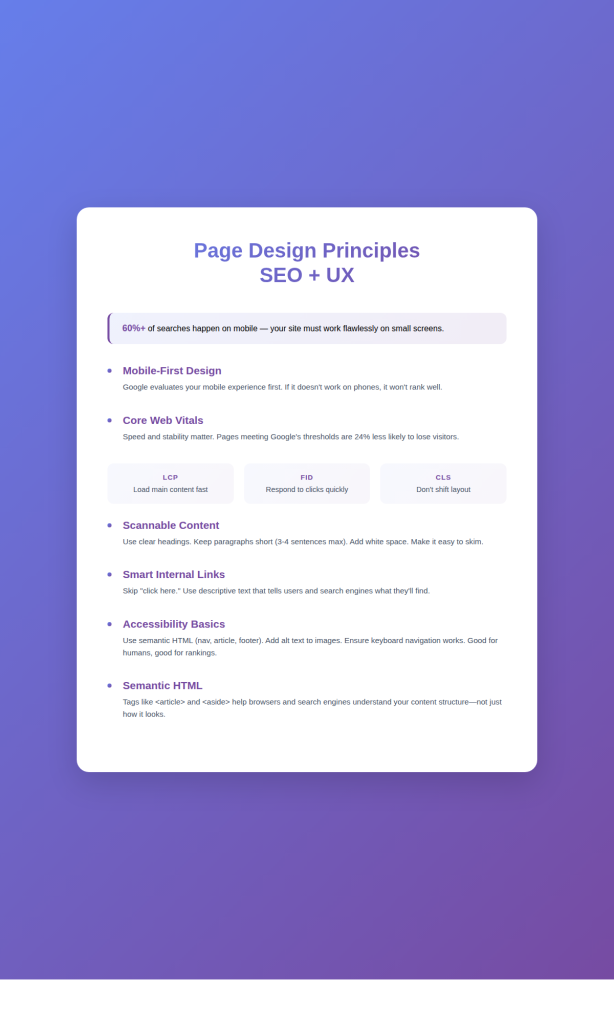
Begin with a Mobile-first Responsive Design
Mobile searches account for over 60% of the total search volume. Your web page’s functionality should perform well on small screens. Google’s mobile-first indexing highlights that search algorithms first evaluate your page’s mobile experience when determining rankings.
Core Web Vitals Optimization
Largest Contentful Paint (LCP), First Input Delay (FID), and Cumulative Layout Shift (CLS) are the three important factors. These quantify aspects of page experience SEO that directly impact user satisfaction. As per Google’s research, pages that meet recommended thresholds are 24% less likely to trigger abandonment.
Build Scannable Content
Use descriptive headings that give a clear idea of what the section will cover. Shorten the long paragraphs into bite-sized pieces (nothing longer than 3-4 sentences ideally). Use lots of white space. Making the formatting choice helps a machine algorithm and a human reader.
Establish Internal Linking Carefully
Links help search engines know your site’s topical relationships. It navigates users to related information. Stop using generic text like ‘Click here’. Instead, use descriptive text that describes the content of the page to which the link points.
Implement strategic internal linking with descriptive anchor text
Links guide users toward related information while helping search engines understand your site’s topical relationships. Avoid generic phrases like “click here”, instead, use descriptive text that previews the destination page’s content.
Ensure Simple Accessibility
Use semantic HTML elements instead of plain divs (nav, article, aside, footer). Make sure to put meaningful alt text in all images. Maintain a proper colour contrast ratio. Make sure everything works with keyboard navigation. These updates make things easier for everyone and send good ranking signals to robots.
Semantic HTML & Editorial Context
Semantic HTML is one of the most powerful but underused tools to increase your content’s meaning. Semantic tags assign meaning to various elements on a web page, as opposed to generic tags.
Consider how a <div> element is different than an <article> when wrapping up content. To the eye, they look the same. Nevertheless, the <article>tag allows both your browser and the search engines to understand “this is the main stand-alone content on this page”.
Similarly, using <nav> for navigation, <aside> for supplementary content, and <footer> for end-of-page closure gives the page structural definition.
Editorial context extends beyond individual HTML elements into how you frame and connect ideas throughout your content. Transition sentences that connect related ideas and summary statements that reinforce key points help readers follow your argument while providing algorithms with additional confirmation about your content’s organization.
Signals Humans vs Machines Use to Understand a Page
| Signal | Human Interpretation | Machine Interpretation |
| Font size hierarchy | Larger text indicates importance; creates a visual scanning pattern | H1-H6 tags indicate topic hierarchy; helps understand content structure |
| White space | Provides breathing room; improves readability and focus | Indicates content boundaries; helps parse distinct sections |
| Link color/styling | Visual cue for interactivity; sets expectations | Anchor text provides topic signals; link position indicates importance |
| Image placement | Supports or illustrates adjacent text; breaks up walls of text | Alt text and surrounding context indicate image relevance |
| Loading speed | Affects patience and trust; influences whether the user waits | Indicates technical quality; factors into page experience ranking |
| Navigation clarity | Determines the ability to find information | Indicates site structure; influences crawl depth |
This table shows how the same page elements communicate meaning through different channels to different audiences. Effective page design recognizes and optimizes for both—the essence of balancing UX and SEO.
Common Mistakes That Hurt “Meaning” on a Page
Even experienced web developers unknowingly sabotage their pages’ semantic clarity through common structural mistakes.
Using heading tags to style your text is a big no-no.
Using an H2 tag on text because you want it larger or bolder misleads search engines about the structure of your content. Use CSS for styling and heading tags for actual headings only.
Too many calls-to-action on one page confuse users and Google.
Overloading pages with competing calls-to-action confuses both users and algorithms.
When everything is competing for our attention, it makes it hard to focus on the page. Studies reveal that focused landing pages are consistently better than cluttered ones that fail to convey a singular message.
Ignoring loading performance for flashy features creates a devastating disconnect.
That beautiful parallax scrolling effect might look impressive, but it kills page speed for mobile users on slower networks. Google’s research shows that as page load time increases from 1 to 10 seconds, bounce probability increases by 123%.
Failing to provide adequate textual context around multimedia elements leaves meaning gaps.
Search engines still can’t fully understand video or audio content without textual clues. Images without meaningful alt text represent missed opportunities to communicate your page’s comprehensive topic coverage.
If your rankings have stalled, this 10-step SEO audit checklist shows exactly what to fix and why.
Conclusion
The evolution from keyword-focused SEO to holistic page experience optimization reflects search engines’ understanding that great content deserves great presentation. Your words matter immensely, but their impact multiplies when delivered through thoughtful structure, accessible design, and user-centered experiences.
Our team understands that page experience SEO requires more than keywords; it demands complete alignment between what search engines evaluate and what users value. Connect with 6S Marketers to discover how comprehensive SEO services can elevate your digital presence and drive meaningful results.