

Most businesses install Google Search Console and stop at clicks and impressions. That habit leaves serious growth on the table. Google confirms that Search Console shows how your site performs in organic search, which queries trigger your pages, and how Google crawls and indexes your content.
Organic search still drives the largest share of trackable website traffic. That reality makes Google Search Console one of the most powerful free SEO tools available to businesses today.
Yet most marketing teams barely scratch the surface of its reports. They check rankings. They export impressions. Then they move on.
In this article, we show you how to use Google Search Console reports like a pro. You will learn which reports most businesses ignore, how to extract real search console insights, and how to turn raw data into measurable SEO growth. If you are evaluating SEO agencies or building internal SEO systems, this guide gives you clarity.
How Do You Use Google Search Console Effectively?
To use Google Search Console like a pro, you must go beyond clicks and impressions. Focus on:
- Query-level intent gaps in the Performance report
- Search Appearance and rich result tracking
- Indexing errors that block revenue pages
- Crawl Stats that reveal technical inefficiencies
- Page Experience and enhancement improvements
Professionals use these insights to fix technical issues, improve content strategy, and increase qualified traffic.
Key Takeaways
- Why most businesses underuse Google Search Console
- How to extract deeper search console insights from the Performance report
- How Search Appearance reports impact CTR and trust
- How Indexing reports uncover hidden revenue leaks
- Why Crawl Stats are a technical SEO goldmine
- How to turn Google Search Console reports into strategic SEO action
Why Most Businesses Underuse Google Search Console
Most businesses treat Google Search Console as a reporting tool instead of a decision tool. They check overall clicks. They track impressions. They glance at the average position. Then they close the tab.
This approach misses intent-level data. Google Search Console shows exactly which queries trigger your pages. It shows device segmentation, page-level performance, and query trends over time. It also highlights coverage issues, indexing errors, and enhancements that affect visibility.
Many teams also rely only on third-party tools. Those tools estimate data. Google Search Console reports show actual search performance directly from Google. That data carries authority. When you run SEO for revenue, you use first-party data.
If your agency does not deeply analyze Google Search Console, you should question their process.
Performance Report Beyond Clicks & Impressions
The Performance report is the most used section inside Google Search Console. Most businesses stop at impressions and CTR. Professionals dig deeper.
Start with query intent segmentation. Filter branded vs non-branded queries. Identify commercial-intent keywords. Analyze pages ranking in positions 8–20. These pages represent low-hanging fruit.
Use this process:
- Filter queries by page
- Sort by impressions
- Identify queries with high impressions and low CTR
- Optimize title tags and meta descriptions
- Improve content alignment
Google states that Search Console shows which queries bring users to your site and how your pages perform in Search.
This data reveals:
- Content gaps
- Cannibalization
- Underperforming high-value pages
- Quick optimization wins
When agencies talk about strategy, they should reference performance data inside Google Search Console reports. Real SEO starts here.
If you want professionals who translate raw SEO data into a revenue strategy, connect with 6s Marketers. Explore our SEO services.
Search Appearance & Rich Results Reports
Search results no longer show only blue links. They show FAQs, product ratings, videos, and more. Search Appearance data inside Google Search Console tracks how your pages perform in these enhanced formats.
Rich results improve visibility and CTR. Google confirms that structured data enables rich results in Search.
Many businesses ignore this report. That oversight costs traffic.
Check:
- FAQ rich results
- Product snippets
- Review ratings
- Video results
If impressions are high but CTR stays low, rich result optimization may solve the issue.
Search Appearance reports also show whether your structured data works correctly. Errors here block eligibility. Fixing them often produces measurable CTR improvements without creating new content.
This is strategic SEO, not guesswork.
Indexing Reports That Reveal Real SEO Problems
If Google does not index your page, it does not rank. That truth makes the Indexing report one of the most important Google Search Console reports.
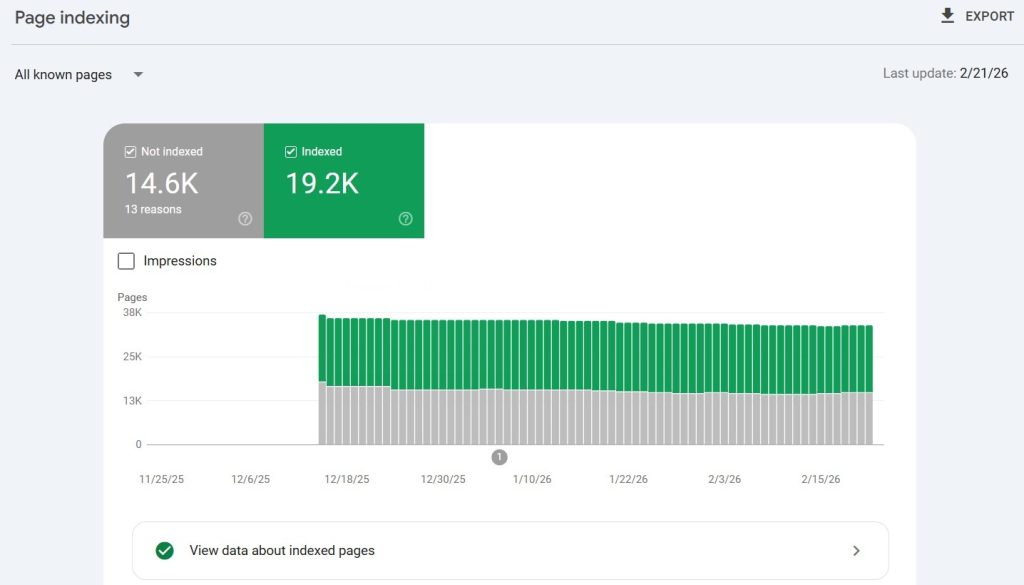
The Pages report shows:
- Crawled but not indexed
- Discovered but not indexed
- Duplicate without a user-selected canonical
- Server errors
Google explains indexing status and page coverage issues clearly inside Search Console documentation.
Many businesses lose traffic because revenue pages remain unindexed. They create content. They promote it. Google never indexes it.
Audit this monthly:
- Check important URLs
- Inspect live URLs
- Validate fixes
- Monitor indexing trends
When SEO agencies ignore indexing reports, they ignore revenue.
Crawl Stats: The Most Ignored Goldmine
Crawl Stats show how Googlebot interacts with your site. Most businesses never open this report.
Crawl activity affects:
- Indexing speed
- Server health
- Technical SEO performance
Google provides crawl statistics to help site owners understand how Google crawls their site.
Review:
- Crawl requests trend
- Response time
- Crawl response codes
- File type breakdown
If crawl requests drop sharply, visibility may decline. If response time increases, server performance may hurt SEO. If error responses spike, rankings suffer.
Technical SEO professionals use Crawl Stats to diagnose performance issues before traffic drops. This report gives predictive signals.
Enhancements & Page Experience Insights
Google prioritizes user experience. The Page Experience and Core Web Vitals reports inside Google Search Console reflect that priority.
Core Web Vitals helps you measure loading performance, interactivity, and visual stability.
Poor experience reduces rankings and conversions. Google Search Console reports show:
- Mobile usability errors
- Core Web Vitals issues
- HTTPS status
Enhancements reports also track:
- Breadcrumb structured data
- FAQ schema
- Product markup
Businesses often invest heavily in content but ignore experience signals. Strong SEO integrates technical performance, structured data, and usability.
Search console insights in this section connect directly to both ranking and conversion outcomes.
How to Turn GSC Data into Action
Data alone does not produce results. Execution does.
Here is a practical framework:
1. Identify Opportunity Keywords
Filter queries ranking in positions 8–20. Optimize content depth and internal linking.
2. Improve CTR
Rewrite title tags for high-impression, low-CTR queries.
3. Fix Indexing Issues
Resolve “Crawled – currently not indexed” pages for priority URLs.
4. Optimize Structured Data
Fix enhancement errors to unlock rich results.
5. Monitor Technical Health
Review Crawl Stats and Core Web Vitals monthly.
Professional SEO teams create dashboards from Google Search Console reports. They align them with revenue KPIs. They review them weekly.
If your SEO partner does not show structured analysis from Google Search Console, you should ask for it.
Conclusion: Use Google Search Console Strategically, Not Passively
Google Search Console is not just a reporting dashboard. It is a strategic growth engine. It shows how Google views your website. It reveals intent gaps. It highlights technical weaknesses. It identifies CTR opportunities.
Most businesses ignore half of their power. Smart businesses use it to drive measurable growth.
If you are searching for an SEO agency that understands how to turn search console insights into a revenue strategy, connect with 6s Marketers. Our expert team builds SEO systems backed by real Google Search Console data, not vanity metrics.
Learn more about our SEO solutions. Strong SEO decisions start with real data. Google Search Console provides it. The right strategy multiplies it.