Crawl Budget Optimisation: A Complete Guide for SEO Success


You have spent several months building a technically sound website. Your content is strong. Your backlinks are growing. But traffic? Stubbornly flat. This could be because of neglecting Crawl Budget Optimisation.
Search engine crawlers don’t have unlimited time to spend on your website. They operate within defined limits, and if your site isn’t structured to work within those limits, entire sections of your content can go unnoticed — unindexed, unranked, invisible.
Crawl budget optimisation is one of the most ignored levers in technical SEO. Especially for large websites, if you get this wrong, it will cause real business consequences. In this guide, we break down what a crawl budget is, why it is important, and how you can optimise it.
Key Takeaways
- Crawl budget controls the number of pages Google actually crawls and indexes.
- Wasted crawl cycles on low-value pages keep your best content out of search results.
- URL bloat, thin pages, and server errors are the top culprits draining your crawl budget.
- Robots.txt, canonical tags, and internal linking are your primary optimisation levers.
- Google Search Console’s Crawl Stats report is the starting point for any crawl audit.
- Sites with thousands of pages feel the impact most — but the principles apply at every scale.
What is Crawl Budget
The crawl budget means the number of URLs that Googlebot will crawl on your website within a given timeframe. Think of it as the allocation of crawling resources that Google is willing to commit to your domain. It’s not a setting you can manually configure. It is identified by Google based on two primary factors: crawl rate limit and crawl demand.
Your crawl rate limit is the speed at which Googlebot crawls your site without plastering your server with too many requests at once. The impact of that is basically reflected in how much Google wants to crawl your content – and that’s largely determined by how popular your URLs are and how often the content gets updated. These two factors put together help define the size and shape of your Google crawl budget.
For a small website with a few hundred pages or fewer, a crawl budget is rarely something you need to worry about. But if you’re in charge of managing thousands of URLs – say e-commerce product listings, news sites, or big SaaS platforms, for example – understanding your crawl budget in SEO terms can be a real game changer.
Why Crawl Budget Matters for SEO
Google doesn’t crawl everything on your site. If you have pages with thin content, duplicate pages that don’t add much value, or just plain broken links – not to mention URL parameters that generate loads of near-clone pages, you can bet Googlebot is wasting its time on stuff that’s not even worth worrying about – and that means your really important content is getting left behind in the process.
For example, you are running an online store with 50,000 product listings. You’ve also got thousands of extra URLs like www.example.com/product/123?color=blue&size=M popping up in search results, eating into Google’s precious crawl cycles instead of on the actual core product pages that are worth crawling. Sales pages that should be driving conversions sit unindexed.
Crawl budget optimisation is the discipline of ensuring every crawl cycle Google spends on your domain counts. It directly influences how quickly new content is discovered, how reliably updated pages are re-indexed, and whether your most important pages are actually shown in search results.
If you’re working through a broader technical SEO strategy, this fits naturally into the foundation. You can explore a comprehensive technical SEO checklist to understand where crawl budget optimisation sits alongside other critical priorities.
How Search Engines Measure & Assign Crawl Budget to Your Website
Google’s crawl budget allocation isn’t arbitrary — it’s algorithmic. Several factors work together to determine how much attention your domain receives:
- Site authority and PageRank: Higher-authority domains tend to receive larger crawl budgets. Google invests more time where it expects to find valuable, trustworthy content.
- Crawl health: Sites returning 5xx server errors, consistently slow response times, or frequent timeouts signal unreliability. Googlebot pulls back from sites that penalise its bots.
- Content freshness: If your pages change frequently and Google has historically found value in re-crawling them, crawl demand increases naturally.
- URL bloat: Unnecessary URLs — parameterised pages, session IDs, internal search result pages — inflate your crawlable footprint without adding indexable value.
- Internal link structure: Pages that receive strong internal link signals are prioritised. Orphaned pages that have no internal links pointing to them are easily missed by the Googlebot.
Google’s crawl decisions are more nuanced than a simple budget counter. They reflect Google’s ongoing evaluation of your site’s health, authority, and content quality. The goal of crawl budget optimisation is to present the cleanest, most efficient version of your site to those crawlers.
Common Crawl Budget Issues
Most crawl budget problems are usually the result of our own mistakes. Here are the sequences that are shown most often:
1. Duplicate Content and Parameters
The Wrong Sort of Help URL parameters get a bad rap. E-commerce sites are a prime culprit when it comes to unnecessary duplicate URLs. Filtering and sorting systems can churn out hundreds of thousands of near-identical URLs, with each one wasting Googlebot’s time.
2. Low-Quality Content
Boilerplate pages and auto-generated tag pages don’t do your site any favours. They’re just a waste of time for Googlebot, and they dilute the overall quality signal of your domain. And to make matters worse, they’re eating into the crawl budget that should be going to your actual good stuff.
3. Broken Internal Links and Redirect Chains
Every 404 error Googlebot hits is a waste of time. Every redirect chain it has to follow is just making things harder for itself. Imagine your internal linking structure was a bit like an airport, and every time there was a delay or a missed flight, it made the whole system less efficient. A clean internal link structure isn’t just good for users, it’s also an efficiency thing that stops wasting your crawl budget on useless pages.
4. Servers that Take Ages to Respond
When your server is slow to respond, Googlebot just sits there waiting – and then gives up and moves on. Consistently slow server responses can train Googlebot to think that your site is unreliable, and that cuts down on how enthusiastically it crawls your site.
5. Not Using Crawl Directives
If you haven’t set up your robots.txt file to block the bits of your site that don’t do anything for SEO, then you’re basically leaving the door open for crawlers to go wandering into the parts of your site that don’t count – admin panels, thank-you pages, and internal search results, etc.
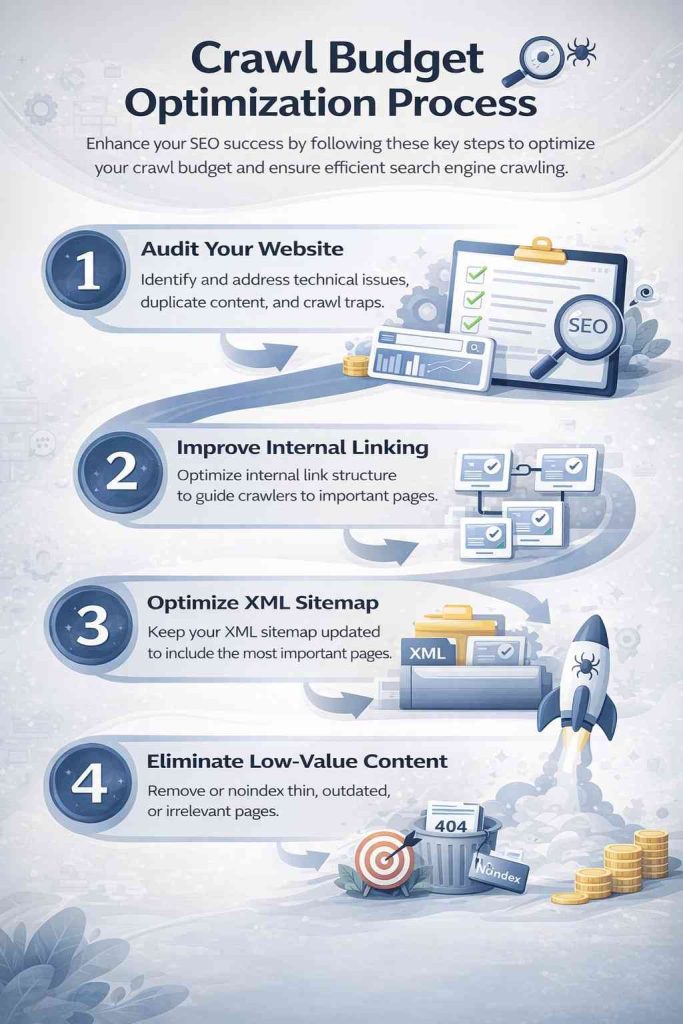
How to Get Your Crawl Budget Sorted
Fixing your crawl budget is all about a series of deliberate little tweaks, each made to target a specific problem. Here are the key areas to focus on:
Block Low-Value URLs with Robots.txt
First line of defence – use robots.txt to stop Googlebot from accessing pages that don’t need to be indexed – faceted nav, URL parameters, internal search pages, admin bits, etc.
Consolidate Duplicate Content
Canonical tags are a lifesaver here. They tell Google which version of a page is the real one. Even if you’ve got parameterised URLs that are basically the same, canonical tags can redirect crawl authority to the primary page. When done right, this stops the crawl budget from getting wasted without hurting user experience.
Fix Technical Errors Systematically
Get a regular crawl audit in and catch those 404s and 5xx server errors, as well as any redirect chains. Every technical error you fix is a bit more crawl power freed up to get to the good stuff.
Make Internal Linking Work
Pages that get internal links get crawled more reliably. So audit your internal link structure, find the orphaned pages, and make sure that the high-authority bits of your site can get to the content you actually want indexed. Your site’s structure is a map for crawlers.
Improve Page Load Speed
The faster your pages load, the more of your site Googlebot can get to within the same time window. Focus on cutting down your server response time (TTFB), get rid of any render-blocking resources, and invest in server infrastructure that can handle the crawl load without struggling.
Use XML Sitemaps Wisely
Your XML sitemap should be a nicely curated list of pages you actually want indexed – not a dump of every single URL on your site. Keep it up to date, submit it to Google Search Console, and get rid of any pages that have been deleted or noindexed.
And believe it or not, many businesses overlook the data that’s just sitting there in their analytics platforms. If you know how to use Google Search Console reports properly, you can get direct visibility into how Googlebot is interacting with your site right now.
Ready to stop losing rankings to crawl inefficiencies? Let’s talk.
Best Tools for Crawl Budget Analysis
When you don’t know what the objective is, it would be challenging to make the right decision about optimization. To get control of things, you can use these tools to get the visibility you need:
Google Search Console
The Crawl Stats report provides you with a daily breakdown of the number of pages Googlebot is crawling, the time it’s taking, and what is happening with those crawls. It’s the most direct way to get a grip on how Google is allocating its crawl budget for you.
Screaming Frog SEO Spider
Just run it across your entire site & you’ll get a map of broken links, redirect merry-go-rounds, orphaned pages, duplicate content, & missing canonical tags. Really useful for doing some pre-audit reconnaissance & finding things before they become major issues.
Semrush Site Audit
Their automated crawl health analysis gives you a list of prioritised issues. Good for keeping on top of things on a big site that’s changing all the time, & where you’re not sure what’s going to break next.
Sitebulb
They do pretty visual crawl maps & give you detailed scores on your site’s technical health. Can be super useful when you need to explain crawl issues to non-technical people who just want to know what’s going on.
Log File Analysers (e.g. Screaming Frog Log Analyser)
Run your server logs through one of these to get the straight dope on what Googlebot’s doing – which URLs it’s visiting, how often, & where it’s running into trouble. It’s the ultimate source of truth about how Google crawls your site.
And if you’re running a big site, the key is to use Search Console data alongside server log analysis to get an honest picture of how your crawl budget is really being used versus how you wish it were being used.
Conclusion
Crawl budget is definitely not a theoretical SEO concept. It’s a practical constraint that determines whether your content gets seen, indexed, and ranked — or quietly ignored.
For large websites, crawl budget optimisation is the difference between a site that scales and one that stagnates. Every technical decision you make — how you handle URL parameters, how you structure internal links, how fast your server responds — affects how Googlebot allocates its limited time on your domain.
Start with your Google Search Console crawl stats. Identify where your crawl budget is being wasted. Fix the foundational issues first: duplicate content, broken links, blocked crawl paths. Then build upward from there with a clear, structured approach to ongoing monitoring and improvement.
The sites that win in search aren’t always the ones with the most content. They’re the ones that make it easiest for Google to find and index the content that matters. That’s what crawl budget optimisation ultimately delivers.
How has crawl budget affected your SEO performance? Have you run a crawl audit recently — and what surprised you most? Drop your experience in the comments.