

Search Console spent a decade answering one question: how does my website do in Google? On 7 July 2026, that question got wider. Google Search Console now allows you to verify social media profiles such as TikTok, YouTube, Instagram, and X, making it possible to track how their content performs across Google Search, Discover, and Google News. No domain, DNS record, or website is required at all. Google made the feature globally available later in July and shipped an analysis guide alongside it. We connected properties for several client accounts during the staggered rollout, and the reports have already changed how we argue about content spend. The sections below explain what the data reveals, what it doesn’t capture, and how it fits into your reporting framework.
A social post has always been a black box once it leaves the platform you posted it on. Instagram tells you reach. TikTok tells you views. Neither tells you that someone typed a question into Google, landed on your Reel, and watched it there. Google Search Console platform properties close that specific gap. The feature does not measure in-app performance, and it does not touch rankings. It measures Google discovery of content you posted somewhere else, which is a category of data most brands have never had.
Key Takeaways
- Verify social accounts without owning a website
- Four platforms supported: Instagram, TikTok, X, YouTube
- Reports cover Search, Discover, and Google News
- Each profile needs its own separate property
- Query data reveals demand your site misses
- Measurement feature only, with zero ranking effect
- Re-verification pauses reporting when logins expire
Inside Google’s Latest Search Console Social Media Tracking
Product Manager Lead Moshe Samet announced the release on the Search Central blog in early July, framing it as a new property type instead of a new report. That distinction matters. Google did not bolt a social tab onto an existing dashboard. It added a third kind of thing you can own inside Search Console, sitting beside domain properties and URL-prefix properties.
There was a dry run. In December 2025, Google shipped “social channels” inside Search Console Insights, a light integration that hinted at where this was heading. The July release turned that experiment into full property-level reporting, complete with the Performance report everyone already knows how to read.
Then, weeks later, Google flipped the rollout to global and published a companion guide on analysing social and video performance. Two announcements inside a month tell you something about internal confidence in the feature.
What Are Google Search Console Platform Properties?
A platform property points at a social or video account instead of a website. You verify it by signing into the platform itself. Once verified, you can track how posts from that account appear in Google Search, Discover, and Google News. These properties behave like every other property you already manage, minus the infrastructure.
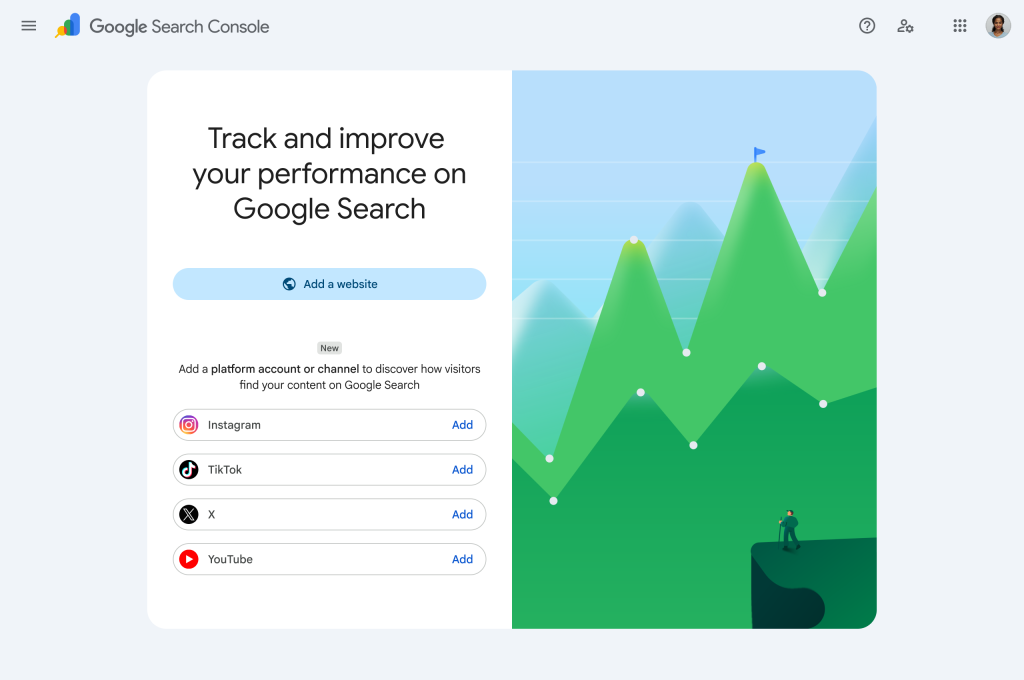
The verification model is the interesting part. Domain verification asks you to prove control of a server. Platform verification asks you to prove control of an account, which means the entire prerequisite of owning web infrastructure disappears. A brand whose whole presence lives on YouTube and TikTok now has a Search Console account worth logging into.
Google’s help documentation is blunt about scope. Data covers Google surfaces only. If someone finds your Reel by scrolling Instagram, that never appears here. If they find it through a Google query, it does.
Which Platforms Are Supported and What You Can Track
The Four Supported Platforms in the Current Release
Four account types made the cut: TikTok, YouTube, Instagram, and X. Facebook is absent. While several major platforms are supported, LinkedIn, Pinterest, and Threads are not among them, limiting coverage for some marketing teams.
Google picked the four whose clips it already drags into results for how-to searches, product comparisons, and whatever is trending that week. Reasonable logic. It still leaves a measurement hole for anyone whose distribution leans professional instead of consumer.
Reports You Get Inside a Verified Platform Property
Search Console social media tracking arrives as three reports on every verified account:
- Performance: the working report. Clicks, impressions, average CTR and average position, sliceable down to one post and the query behind it. It exports cleanly, which matters more than it sounds.
- Insights: the skim view. Trend direction, whatever is currently outperforming, and a read on how people arrive from Google.
- Achievements: milestone badges, calculated across a rolling 28-day window of clicks.
Two definitions in Google’s documentation decide what those numbers actually mean. A Story that surfaces on a results page registers an impression; a tap on it registers a click. Video behaves identically, and the click still counts when playback happens inside Google’s own viewer instead of on the host app.
Need help translating this data into a distribution plan that actually moves pipeline? Talk to our SEO team, and we will map it against your current content calendar.
How Platform Properties Work and How to Set One Up
How to Add a Platform Property Inside Search Console
You can configure a platform property in Google Search Console in about 90 seconds per account.
- Sign in using whichever Google login already holds your website properties.
- Open the property selector from any screen and start a new one.
- Choose the account type you want from the four on offer.
- Log into that account when prompted and approve the authorisation request.
- Wait for Google to confirm ownership, then jump into the property.
With those steps complete, you’ve successfully added your Instagram, TikTok, X, or YouTube account to Google Search Console. Now repeat it for every profile you run. Every verified handle becomes its own property. That means agencies managing several Instagram accounts for one client must switch between separate entries in Search Console. We learned that the tedious way, halfway through onboarding a multi-brand account.
What Happens in the First Days After You Verify It
Empty charts. That is normal, and it panics people every time. Google needs a few days to associate the account and backfill data, so the first login after verification usually shows partial or blank reporting.
One more operational detail buried in the help docs: Google re-checks ownership periodically. When an external login expires, access to the property pauses until you re-verify. The data survives, so you pick up where you left off, but the gap will show up in any automated reporting pipeline you have built. Worth a calendar reminder.
How To Track Social Media in Search Console and What All You Can Do
Find Search Demand Your Website Has Never Picked Up
This is the use case we keep returning to. A YouTube video ranking for a query your blog has never targeted is a content brief handed over free. We ran the query export for one client’s video property against their site’s Search Console queries and found a cluster of comparison-style searches the website had no page for at all. Nobody had spotted that gap in the website data.
Compare Formats Across Platforms in One Spreadsheet
Export each property, drop them into one sheet, and you can finally line up short-form against long-form, or one platform against another, on identical metrics. Google’s own guide recommends exactly this. Clicks and impressions mean the same thing across every property, which is more than can be said for comparing TikTok views to Instagram reach.
Annotations work here too. Rewrite a YouTube title, log an annotation, and watch whether search performance shifts over the following weeks. That turns a hunch into a testable change.
Best Practices for Content Creators Using This Data
If you have been asking how to track social media in Search Console, start by verifying every account you own before you need the data. Reporting starts accumulating from verification onward, so a property added in October cannot tell you what happened in August.
Treat search queries as your editorial input, and treat platform-native analytics as your engagement input. They answer different questions, and blending them into a single dashboard usually produces a number nobody can act on.
Set expectations internally about what this feature does. It reports. It does not rank. Adding a platform property will not lift your web pages, and anyone selling it as a ranking lever is guessing.
Watch the long tail. A TikTok that died in-app after 48 hours can keep pulling Google traffic for months, and that lifespan never showed up in platform dashboards. We now check the 12-month view before writing anything off as a flop.
Finally, audit your naming and captions. Since queries drive discovery here, the words in your caption behave a lot like the words in a title tag. Our team documents this workflow across client accounts at 6S Marketers.
Conclusion
Google Search Console platform properties solve a narrow problem well. Search discovery of off-site content used to be a guess, and now it is a report you can export. That alone justifies an afternoon of setup across every account your brand owns.
Keep the limitations in front of you. Four platforms only. Google surfaces only. Zero ranking impact, whatever the LinkedIn commentary claims. Verification can lapse quietly and pause your data. Reporting starts the day you verify, so delay costs you history you cannot recover.
The strategic value sits in the query export. Google Search Console platform properties show you what people asked Google before they landed on a post you published somewhere else, and those questions belong in your content plan whether or not you ever write another blog. Set up the properties this week, pull the first export in three weeks, and hand it to whoever owns your editorial calendar. The gaps will be obvious.
External Sources Referenced for This Search Console Update
- Google Search Central Blog: See how content from social and video platforms performs on Google Search
- Google Search Console Help: About platform properties in Search Console