

Google not indexing your pages is one of the most common technical SEO failures out there, and one of the costliest. If your page is unindexed, it cannot rank, which means it can’t earn a single click, no matter how well it’s written, designed, or promoted. The cause is almost always one specific, traceable signal: a blocked crawl path, a stray noindex tag, a thin template, or an exhausted crawl budget.
This guide breaks down how indexing actually works, the eight causes that show up most often across growing digital businesses, and the steps to fix each one.
Key Takeaways
- Crawling and indexing are separate, back-to-back steps.
- Most indexing issues trace back to technical signals.
- Robots.txt and noindex tags are the top culprits.
- Search Console shows you exactly what’s blocked.
- Thin content rarely earns index inclusion.
- Internal linking speeds up discovery and indexing.
- Fixing root causes beats repeated manual indexing requests.
What Is the Meaning of “Not Indexed”?
You might have seen that these terms, Indexing and Crawling, get tossed around interchangeably. But they are different.
Crawling is Googlebot fetching a page. Indexing is the separate decision, made afterward, on whether that page earns a spot in Google’s searchable database.
Google’s own documentation on how search works defines that a page can be crawled, processed, and still left out of the index if Google decides it doesn’t add enough value next to what’s already there. That differentiation explains why “page not indexed by Google” shows up so often in Search Console reports (even on technically sound websites). John Mueller, Search Advocate at Google, put it plainly:
“Googlebot will crawl your site, but crawling does not guarantee indexing. Content that doesn’t provide value to users is unlikely to be indexed.”
On very large sites, that selectiveness adds up fast. Mueller has said Google might index as little as a tenth of a site’s pages once you’re talking hundreds of thousands of URLs, simply because indexing the rest isn’t worth what it costs Google to do it. Zoom out, and the same pattern holds: an Ahrefs study of more than 14 billion pages found that 96.55% earn zero organic traffic from Google.
For a lot of those pages, an indexing gap is the first wall, long before rankings even enter the picture. These technical gaps are why Google not indexing pages stays one of the most common diagnoses across growing digital businesses.
How to Check If Your Pages Are Indexed
Before troubleshooting in detail, you have to know if the indexing is really the problem. Rankings and visibility issues can look similar on the surface, and both get lumped together under “why does my website not show up on Google?”
You can use these simple 2 checks, used together, to settle it:
- Site search operator: Type site:yourdomain.com/page-url into Google. If nothing returns, the page likely isn’t indexed.
- URL Inspection Tool in Google Search Console: This gives a direct answer, “URL is on Google,” or a specific reason it isn’t, such as “Discovered, currently not indexed” or “Crawled, currently not indexed.”
The URL inspection tool beats the search operator for reliability, since site: results can be flaky. If your website is not getting fetched in Google search, it impacts a batch of URLs at once. The Page Indexing report groups them by reason, which is much faster than inspecting one URL at a time.
Common Causes of Google Not Indexing Your Pages
Once indexing is confirmed as the actual problem, the reason why Google is not indexing my website almost always lands in one of eight buckets.
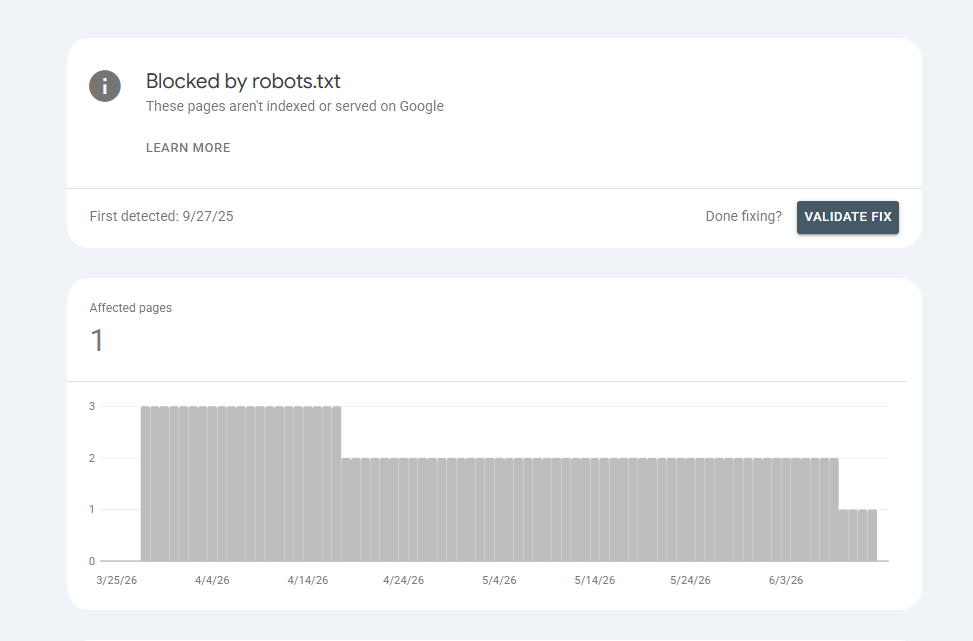
Blocked by robots.txt
We once watched a travel booking platform push a staging robots.txt straight to production during a redesign. It disallowed an entire destination-pages folder, roughly 140 pages that were actively driving bookings, and nobody caught it for weeks because the site looked completely normal to visitors. Only Googlebot was locked out.
Noindex Meta Tag or X-Robots-Tag
Dev environments usually carry a blanket noindex tag to keep half-finished pages out of search. Fine in theory. The problem is how often that tag rides along into production. We’ve seen it on ed-tech platforms right after a CMS migration, where nobody thought to strip it from the new templates. No crawl errors flag it. The pages just stop showing up.
Canonicalization Issues
Marketplaces and aggregator sites generate an enormous number of filter-and-sort URL combinations. Google treats canonical tags as a hint it’s free to override, so when canonical signals are inconsistent or duplicated across templates, Google sometimes lands on a different version than the one you intended. That’s usually what’s behind the ” Google crawled but not indexed” pattern on listing-heavy sites.
Thin or Duplicate Content
Real estate portals run into this constantly. A hundred property listings with near-identical descriptions and the same boilerplate layout don’t give Google much to differentiate. Google indexes a handful and quietly skips the rest, since duplicate-feeling pages rarely offer enough distinct value to earn their own spot in the index.
Crawl Budget Exhaustion
Big ecommerce catalogs with millions of products and variant URLs can outrun the crawl budget Google is willing to spend on a single domain. Out-of-stock variants, expired promo pages, internal search-result URLs: none of it is valuable, and all of it eats into the same budget that should be going toward the pages that matter.
Server Errors (5xx) & Slow Pages
A 500 error or a page that times out won’t get indexed, simple as that. Fintech platforms running flash promotions are especially prone to this: server load spikes hard enough that Googlebot’s crawl attempts fail intermittently, and the failures often don’t show up in normal browser testing. They only surface under the kind of load Googlebot generates.
New Website / No Backlinks
New sites in competitive categories often sit in “Discovered, currently not indexed” limbo for weeks at a stretch. No real surprise there: without internal or external signals pointing to a page’s importance, Google has no strong reason to bump it up the queue.
Poor Internal Linking
Orphaned pages, the ones that nothing links to internally, are hard for Google to even find, let alone justify indexing. This shows up constantly on real estate and marketplace sites, where location or category pages get auto-generated by the thousand but never make it into navigation or related-content modules.
How to Fix Google Indexing Issues (Step by Step)
Fixing Google not indexing pages starts with isolating the specific cause. Generic checklists rarely solve a problem this site-specific.
- Run the affected URLs through the URL Inspection Tool to see Google’s stated reason.
- Cross-check robots.txt and meta robots tags for unintended blocks.
- Audit canonical tags for consistency across templates.
- Strengthen internal linking from high-authority pages on your own domain.
- Consolidate thin and duplicate content into stronger, unique pages.
- Monitor server response codes and page speed under real crawl conditions.
- Submit a clean, indexable-only XML sitemap.
| Cause | How to Fix | Tool to Use |
| Robots.txt block | Remove disallow rules for important paths | Search Console, robots.txt Tester |
| Noindex tag left on | Strip noindex from production templates | URL Inspection Tool |
| Canonicalization conflicts | Standardize canonical tags per template | Search Console, site crawler (e.g. Screaming Frog) |
| Thin or duplicate content | Merge, rewrite, or noindex low-value variants | Content audit tools |
| Crawl budget exhaustion | Remove low-value URLs, clean up sitemap | Page Indexing report, server logs |
| Server errors / slow pages | Fix uptime and response times | PageSpeed Insights, server monitoring |
| New site / weak backlinks | Build internal links, earn relevant external links | Search Console, link audit tools |
| Poor internal linking | Add contextual links from already-indexed pages | Site crawler, internal link audit |
If indexing issues are holding back your organic pipeline, our team runs technical audits that isolate exactly which of these is at play. You can get in touch with our SEO specialists to start one.
For a deeper, lasting fix, pairing this with a broader search engine optimization strategy usually keeps the same issues from resurfacing on future pages.
Using Google Search Console to Monitor Indexing
Google Search Console indexing reports are the most reliable ongoing signal you have. The page indexing report groups every known URL by status: Indexed, Crawled – currently not indexed, Discovered – currently not indexed, Excluded by noindex tag, among others. Reviewing this monthly catches problems before they quietly add up to real traffic loss.
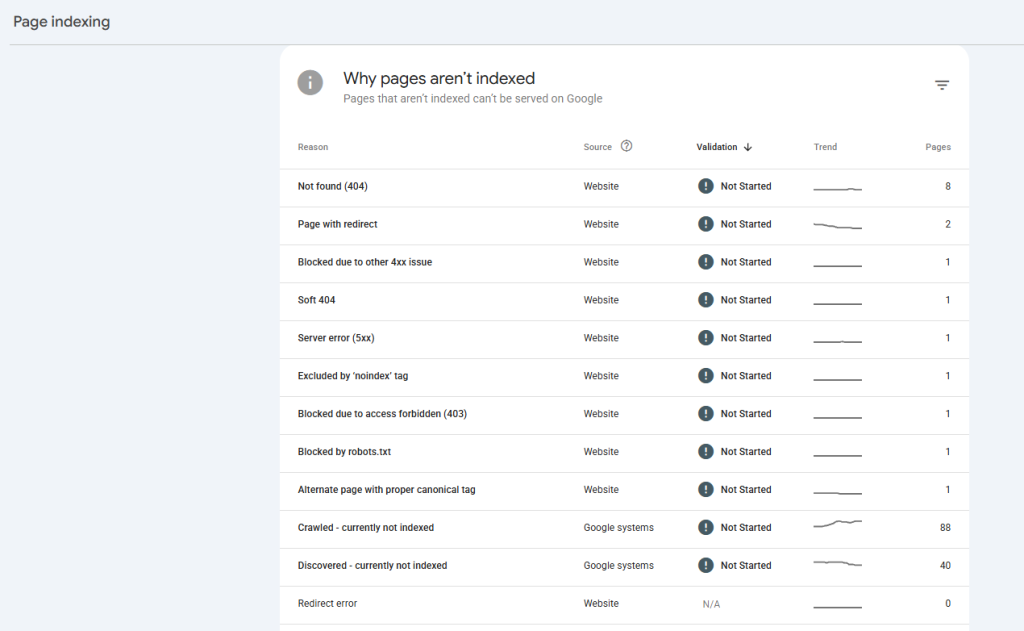
Most businesses only open Search Console when something’s broken. There’s a lot more in there worth checking on a regular cadence. We’ve broken down the Search Console reports most businesses ignore and what they actually reveal about crawl health.
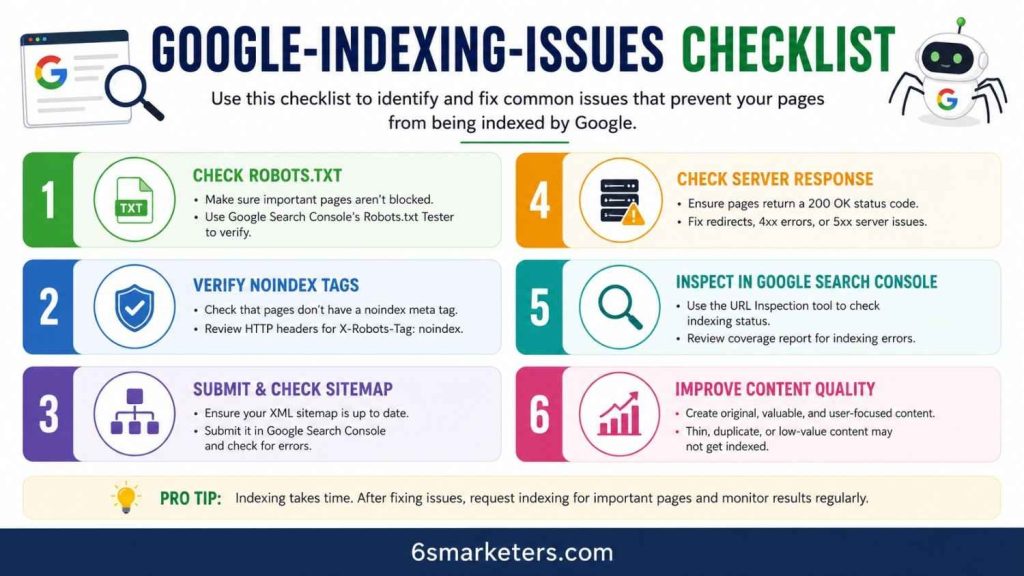
Google indexing issues can quietly prevent your most important pages from appearing in search results. This checklist covers six essential areas to review—from robots.txt and noindex tags to sitemap submission, server responses, Google Search Console diagnostics, and content quality. Use it as a quick reference to identify common indexing roadblocks and improve your website’s visibility in Google Search.
Best Practices to Prevent Indexing Issues Going Forward
Finding these problems sooner will cost you a fraction of what it takes to recover months of lost visibility later.
- Audit robots.txt and meta tags before every major site migration or redesign.
- Keep sitemaps clean so only canonical, indexable URLs are included.
- Add schema markup for SEO where relevant; structured data helps Google understand page context faster.
- Link new pages from high-authority pages on your own domain as soon as they launch.
- Watch server performance during traffic spikes, campaigns, and migrations.
- Review the Page Indexing report monthly, not just when traffic drops.
Make these habits part of regular SEO maintenance. That consistency, more than any single fix, is what answers how to get Google to index my website over time.
Conclusion
Indexing problems rarely come out of nowhere. Usually, it’s one robots.txt rule, one leftover tag, or one orphaned URL standing between a page and the index. Treat Google not indexing pages as a diagnosable technical issue, and the fix becomes a repeatable process.
If your pages are crawled but never indexed, what’s the one fix you haven’t tried yet? Drop it in the comments. Chances are, someone else here is dealing with the exact same gap.
External Sources
- Google Search Central: How Search Works: Crawling, Indexing, and Serving
- Ahrefs: SEO Statistics 2026