

Every website redesign has the same risk: strong design, weak protection for search visibility, and a ranking drop that shows weeks after the launch celebration. In our audits of post-redesign traffic loss, the cause is rarely the new layout. It’s a missed redirect, a mismatched title tag, or a content team briefed too late to protect what was already working. An effective SEO checklist for website redesign can lead to a relaunch that builds on your current search equity, while a poor one can set you back for the next six months.
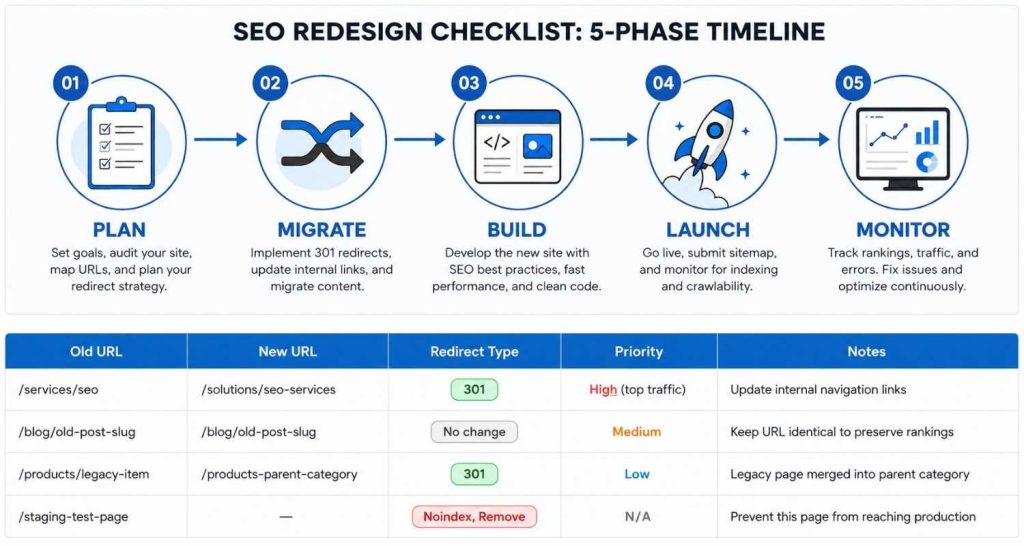
Here is what we run on every client engagement as the SEO checklist for website redesign: five phases, twenty-five steps, built around what actually breaks rankings during a real relaunch, not best-practice filler.
Key Takeaways
- Redesigns fail SEO from missing redirects, not design.
- Audit and freeze your baseline before touching code.
- Map every URL before a single page moves.
- Content rewrites should wait until after migration.
- 301 redirects protect link equity; 302s don’t.
- Staging environments need noindex, not deleted robots.txt
- Expect a dip; panic only past week four.
- Post-launch monitoring matters more than launch day.
What This Redesign Checklist Actually Covers
Before you hand this to your web dev team or agency, it helps to know what’s inside. This isn’t the type of list you plug into a template. It is organized in the order in which things actually break during a real-life relaunch, whether that is gaps in your planning and strategy, errors with content and URL migration, technical debt from new frameworks and tooling later on, launch day issues, and the slow bleed that happens in weeks from go-live if no one is watching. These are the phases built on the previous one. If you are skipping one, it equals redoing in the next.

Why Redesigns Quietly Affect Search Rankings
The failure of many redesigns stems from the fact that SEO is treated as a launch-day checkbox rather than an input into the design. Teams spend a long time creating mood boards and component libraries, then hand over the completed build to marketing one week before go-live and ask, “Will this still rank?” By the time SEO enters the conversation, most of the critical decisions have already been made. The new URLs are finalized, valuable metadata has disappeared during the CMS migration, and the old XML sitemap was never backed up.
According to Google’s own migration guidance, it is clear that there will be a change in rankings if a site undergoes a major transformation. The extent of those changes, however, is more determined by planning.
The Complete SEO Checklist for Website Redesign (25 Steps)
Here’s the full website redesign SEO checklist, grouped into five working phases. Treat each phase as a gate — don’t move to the next until the current one is genuinely done, not just “mostly done.”
Phase 1: Before You Touch the Design
- Crawl your current site with a tool like Screaming Frog and save the export. This becomes your reference copy if anything goes sideways later.
- Export Search Console and analytics data by URL, including impressions, clicks, and conversions for at least the past 12 months.
- Know your top-performing pages by traffic, backlinks, and revenue. These get the most protective attention.
- Document every SEO-critical element currently in place: title tags, canonicals, schema, hreflang, and internal link anchor text.
- Include an SEO stakeholder in the very first planning meeting, not the one before launch.
Phase 2: Content and URL Migration
- Establish a content inventory that includes what stays, what merges, what gets cut, and what’s genuinely new.
- If there is no strong reason to change the existing URLs, keep them unchanged.
- Where URLs must change, build a one-to-one redirect map (old URL to new URL, no exceptions).
- Update internal links to point directly to new URLs, not through a redirect chain.
- Preserve or improve on-page elements (titles, meta descriptions, headers) for pages that already rank.
Phase 3: Technical SEO and Site Architecture
- Use 301 redirects for anything permanent — never 302s, which don’t reliably pass ranking signals.
- Rebuild your XML sitemap to reflect only live, indexable new URLs.
- Set canonical tags correctly across templates, especially on paginated or filtered pages.
- Carry over (or expand) structured data and schema markup so search engines keep understanding your content the same way.
- Check that your new CMS or JavaScript framework doesn’t hide content from crawlers; server-side rendering matters here.
- Benchmark Core Web Vitals on the new build before launch, not after.
Phase 4: Pre-Launch and Launch Day
- Deploy to staging with a noindex tag, not a robots.txt block that could accidentally carry over to production.
- Crawl the staging site and confirm every redirect, canonical, and status code behaves as planned.
- Verify analytics and Search Console tracking codes fire correctly on the new templates.
- Get stakeholder sign-off against the original SEO goals, not just the visual design.
- On launch day, submit the new sitemap to Google Search Console and Bing Webmaster Tools immediately.
Phase 5: Post-Launch Monitoring and Recovery
- Crawl the live site within 24–48 hours and compare it against your pre-launch reference crawl.
- Monitor Search Console frequently, like daily for the first few weeks, then weekly for the next two months.
- Investigate any 404 spike or indexing drop immediately rather than waiting for a monthly report.
- Reach out to top referring domains whose backlinks still point to old URLs, and re-promote cornerstone content once rankings stabilize.
If your team is knee-deep in this kind of URL mapping and wants a second set of eyes before launch, our team offers a pre-launch SEO redesign review to catch what internal reviews tend to miss.
Common Mistakes That Undo a Website Redesign SEO Checklist
A few patterns show up again and again in post-mortems:
- Content and dev work are happening in silos. Writers finalize copy without knowing the URL structure is about to change, so internal links get built against pages that no longer exist.
- Treating the staging environment casually. A robots.txt block meant for staging occasionally survives into production, quietly telling Google not to crawl the new site at all.
- Redesigning and migrating domains simultaneously. Stacking a visual overhaul with a CMS platform switch and a URL restructure makes it nearly impossible to tell which change caused a ranking drop.
- Declaring victory too early. Two weeks of stable rankings doesn’t mean the migration succeeded — Google’s own documentation notes that reindexing a mid-sized site can take several weeks, longer for larger ones.
Conclusion
A SEO redesign checklist isn’t a one-time compliance exercise you file away after launch. The sites that come out of a redesign stronger than before are the ones where SEO had a seat at the table from the first wireframe, not a review slot the week before go-live. Revisit your KPIs at 90 days, feed the lessons into your next content sprint, and keep the redirect map somewhere your whole team can find it a year from now. If you want a broader view of how brands are protecting and growing organic traffic beyond just the redesign window, that’s worth a read too.
If your redesign is already underway and you’re not sure what’s been missed, it’s worth getting a second opinion before launch rather than after. Our team can walk through your current migration plan and flag gaps while there’s still time to fix them.